

Cab booking software for operators and car rental teams.
DutyGo is trip booking management software that takes each booking once and keeps it in one searchable list. DutyGo records the guest, company, pickup, drop, date, time, duty type and billing type, then carries the booking through allocation, tracking and invoice.
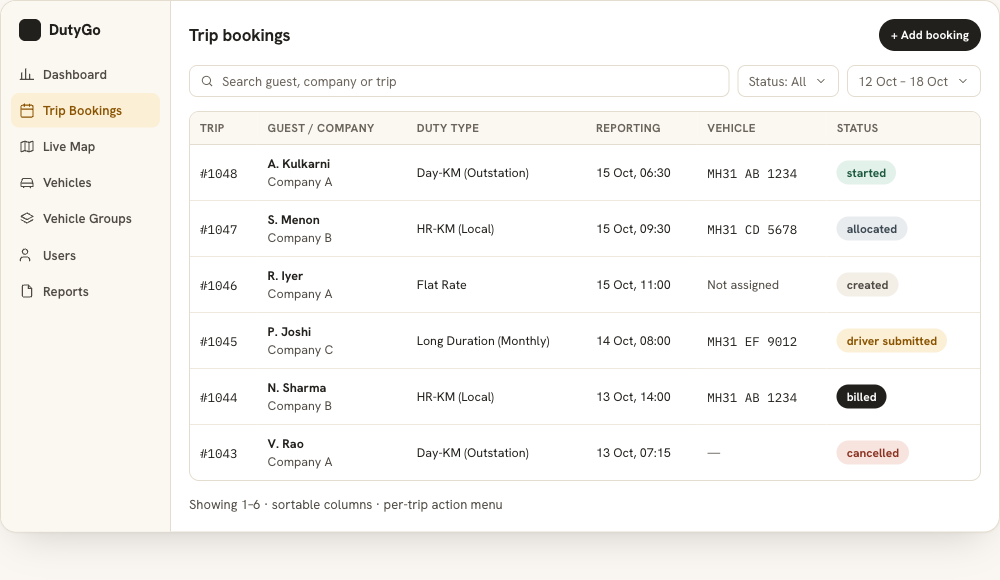
Every booking in one list, with its status in view.
When bookings arrive by phone, email and chat, someone has to copy them into a sheet and chase the status. In DutyGo the booking list is the single source of truth: search it, filter it by status and date, and open any trip to see its full history.
- Create and edit bookings with guest, company, pickup, drop, date and time.
- Search, filter and paginate large booking lists.
- Open a trip to see its details and status history.
Once a booking is in, allocate a vehicle and driver and share a live tracking link. Clients can also use a corporate admin login, and rental-style duty types are covered in car rental management.
Booking features
Guest and company details
Capture who is travelling and which company the booking belongs to.
Pickup, drop and schedule
Record the pickup, drop, date and reporting time so dispatch has the full picture.
Duty type
Choose HR-KM (Local), Day-KM (Outstation), Long Duration (Monthly) or Flat Rate.
Billing type
Company/Customer, Company (Credit Card), Company (Direct Payment) or Personal.
Change with the plan
Add or remove vehicles on a booking when plans change, or cancel with a recorded reason.
Direct booking
Companies and customers can add bookings from their own admin login instead of calling.
From booking request to billed trip
Receive
A dispatcher, company admin or customer admin creates the booking.
Confirm
The booking appears in the list, ready for allocation.
Follow
Track its status from created through to billed.
Review
Open the trip for details, history and documents.
Online cab booking for operators, companies and customers
DutyGo works as cab booking management software, taxi booking software and an online trip booking management system for operators who take bookings every day. See how it fits into the full online trip booking management system overview, and how duties are planned in cab duty scheduling software.
Clients can add their own bookings through a customer self-service cab booking portal, and companies use corporate cab booking. Local guides: cab booking software in Pune, cab booking software in Mumbai and cab booking software in India.
What details can a trip booking hold?
Can my customers create bookings themselves?
Can I change a booking after creating it?
What billing types are available?
Find what you need.
Ready to simplify your duty operations?
See DutyGo in action with a free walkthrough tailored to your fleet.