

Digital duty slips and invoicing, straight from the completed trip.
The driver closes the trip, the guest signs the duty slip digitally, and the invoice is generated from the same record. No paper to lose and no figures to type again.
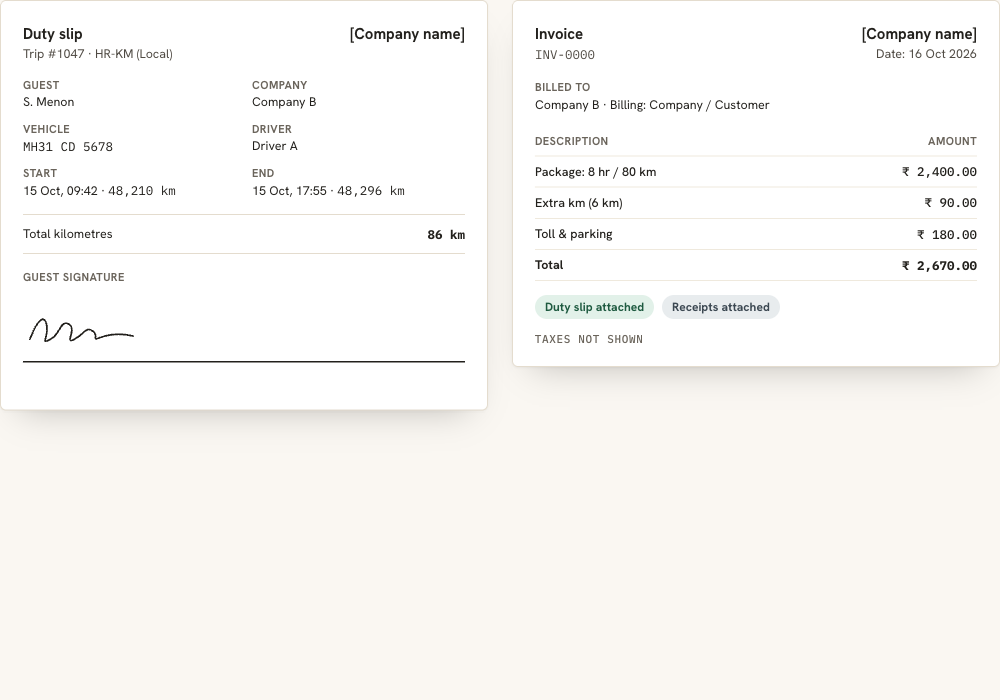
Close the loop between the trip and the bill.
Paper duty slips get lost, signed late or disputed, and invoices built from them take hours. In DutyGo the trip details, kilometres and bills are captured digitally, so the slip and invoice come from the same data.
- Duty slips and invoices are generated as PDFs.
- The guest's digital signature is captured on the duty slip.
- Invoices can be re-issued when a trip changes.
Bills and kilometres come from driver trip updates. Companies can follow invoices from a corporate login. See all duty slip and invoice features.
Slips, invoices and documents
PDF duty slips
Generate a duty slip for the trip as a PDF.
Guest signature
Capture the guest's digital signature on the duty slip.
Invoices from trips
Generate the invoice from the completed trip.
Re-issue when needed
View, update and re-issue invoices when a trip changes.
Supporting documents
Upload and view photos and documents such as toll and parking receipts.
Invoice reports
Download invoice reports for finance as PDF or CSV.
From signature to invoice
Driver ends the trip
End kilometres, photos and comments are submitted.
Guest signs
The guest signs the duty slip.
Operator approves
The operator reviews and approves the trip.
Invoice generated
The trip becomes ready for bill, then billed.
Digital duty slip generation software and cab billing
As duty slip software and digital duty slip generation software, DutyGo creates PDF duty slips with the guest's digital signature. Invoice generation follows from the completed trip, so it also works as cab invoice software. Together that is practical cab billing software for operators who want to stop chasing paper slips.
Drivers capture kilometres and bills in driver trip updates and expenses, long runs are billed through outstation cab management software, and the whole flow is described in the taxi trip management platform overview. Corporate clients: corporate cab booking management.
How does the guest sign the duty slip?
Can an invoice be changed after it is generated?
What happens to toll and parking bills?
Is GST e-invoicing supported?
Find what you need.
Ready to simplify your duty operations?
See DutyGo in action with a free walkthrough tailored to your fleet.