

Driver trip updates, expenses and guest verification from a phone link.
Drivers open a simple link on their phone to start and end a trip, record kilometres, add toll and parking bills with photos, and confirm the trip with the guest's signature or OTP.
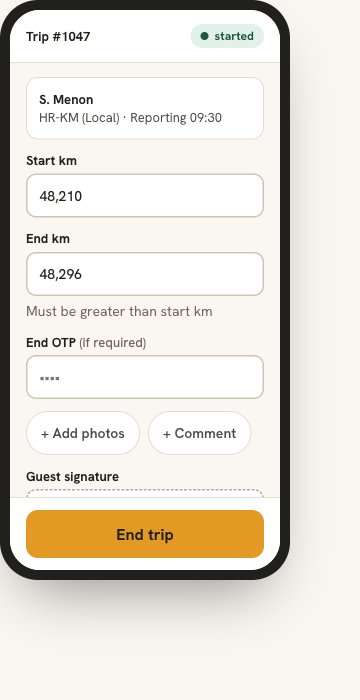
Capture the trip where it happens.
Details written down after the trip are often incomplete or disputed. With DutyGo the driver records them as the trip happens, and the guest confirms them, so the operator and accounts start from verified facts.
- No app install is needed. Drivers open a simple link on their phone.
- The end kilometres must be higher than the start kilometres.
- Toll, parking and other bills attach to the trip with a photo.
What the driver submits flows into duty slips and invoicing. The trip is assigned through driver and vehicle allocation. See also the driver features overview.
What the driver can do
Start and end the trip
Update the trip status and details from the phone.
Guest verification
Capture the guest's signature or enter the guest's OTP at the start and end of the trip.
Kilometre checks
Start and end readings are checked automatically.
Expenses with bill photos
Add toll, parking and other expenses with the amount and a photo of the bill.
Photos and comments
Add photos and comments when ending the trip.
Straight to accounts
Bills attach to the trip so accounts can check them and include them in the invoice.
A driver's trip, step by step
Open the link
The driver opens the trip link on their phone.
Start
Enter the start kilometres and verify with the guest.
Add expenses
Record toll, parking and other bills with photos.
End
Enter end kilometres, photos and comments and verify again.
Driver trip updates for owners, operators and companies
Drivers (chalak) update trips for the owner (malak) from a phone link; see chalak–malak booking management. The kilometres and bills captured here feed digital duty slips and invoicing and the billing of long runs in outstation cab management software.
Companies can follow the same trip through corporate cab booking management.
Do drivers need to install an app?
How does guest verification work?
Which expenses can a driver add?
What happens after the driver submits the trip?
Find what you need.
Ready to simplify your duty operations?
See DutyGo in action with a free walkthrough tailored to your fleet.