

Driver and vehicle allocation software for dispatch teams.
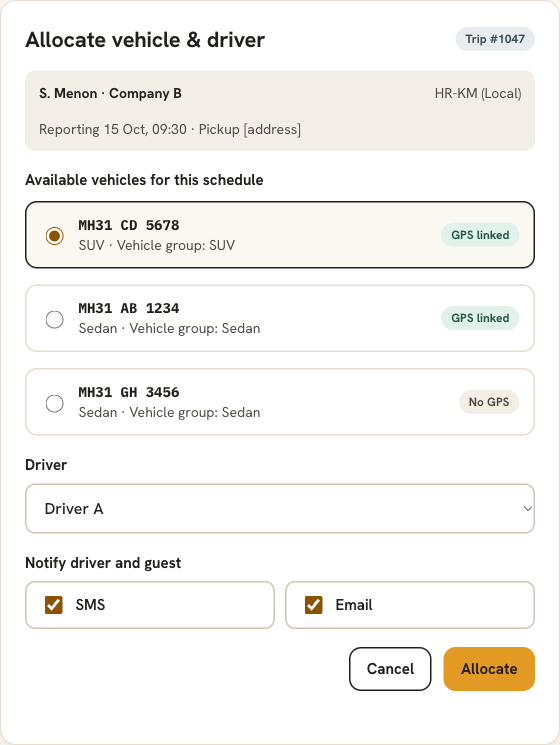
See which vehicles are available for a schedule, pick a driver and assign both in a click. DutyGo notifies the driver and guest by SMS or email, and shows which vehicles have GPS linked.
Know what is free before you assign it.
Allocation goes wrong when the dispatcher cannot see availability and has to ask around. DutyGo lists the vehicles available for the trip's schedule, so the choice is made from the system, not from memory.
- Available vehicles are listed for the trip's schedule.
- Each vehicle shows its type, vehicle group and whether GPS is linked.
- The driver and guest are notified in the same step.
Allocation follows trip booking and leads into live tracking and driver trip updates.
Allocation features
Vehicle master
Keep registration number, vehicle type and GPS device (IMEI) for every vehicle.
Vehicle Groups
Group vehicles for easy assignment and pricing.
Allocate or change
Allocate a vehicle and driver, or change either one later for any trip.
Add or remove vehicles
Adjust the vehicles on a booking when plans change.
SMS and email
Notify the driver and the guest using reusable message templates.
Ready for tracking
A GPS-linked vehicle can be followed live as soon as the trip starts.
Allocating a trip
Open the trip
Pick a booking that needs a vehicle.
Choose a vehicle
Select from the vehicles available for that schedule.
Choose a driver
Assign the driver for the trip.
Notify
Send details by SMS or email from a template.
Cab dispatch management for operators and owners
Allocation is the heart of cab dispatch management software: dispatch sees the vehicles and drivers available for the schedule, assigns them and notifies them by SMS or email. Smart dispatch suggestions are on the roadmap and not available today.
Owners and vendors who allocate their own fleet can read driver and owner booking management and cab vendor management software. The full trip flow is in the taxi trip management platform overview.
Does DutyGo show only the vehicles that are available?
Can I change the vehicle or driver after allocating?
How are drivers and guests told about the allocation?
Does DutyGo suggest vehicles automatically?
Find what you need.
Ready to simplify your duty operations?
See DutyGo in action with a free walkthrough tailored to your fleet.