

Cab duty management software that keeps every duty on one record.
A cab duty is more than a booking. It needs a vehicle, a driver, a duty type, a trip log, a signed slip and an invoice. DutyGo holds all of it in one place, from the first call to the final bill.
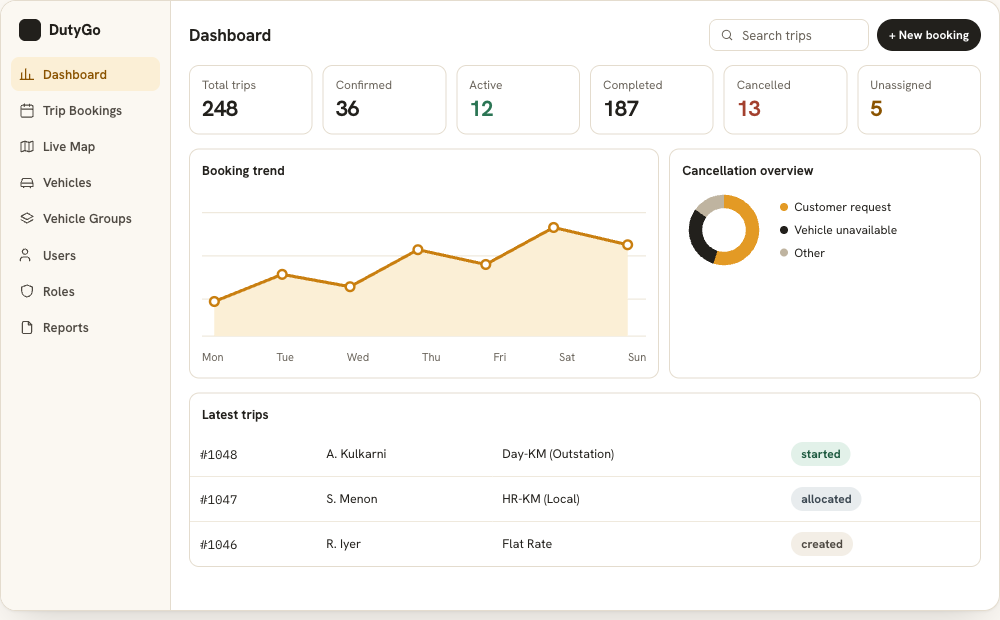
Stop piecing a duty together from chats and sheets.
Most duty operations run on phone calls, WhatsApp groups and spreadsheets. Each tool holds part of the story, so dispatch, drivers and accounts keep asking each other what happened. DutyGo gives every duty one record that all of them work from.
- One booking record carries the guest, company, pickup, drop, date and time.
- The same record gets a vehicle, a driver, a live tracking link and a trip log.
- The duty slip and invoice are generated from the completed trip, not typed again.
Look at trip booking and duty slips and invoicing in more depth.
What you can manage in a duty
Four duty types
HR-KM (Local), Day-KM (Outstation), Long Duration (Monthly) and Flat Rate, so each job is set up the way you sell it.
A clear status at every step
Duties move through created, allocated, started, ended, driver submitted, approved, ready for bill and billed. Cancelled duties keep a recorded reason.
Allocation in a click
Pick an available vehicle and driver for the schedule and notify them by SMS or email.
Live dashboard
Confirmed, started, completed and cancelled counters with line and pie charts show where the day stands.
Trip log and verification
Start and end kilometres, guest signature or OTP, and bills with photos are captured by the driver.
Reports
Download reports by date range as PDF or CSV for finance, audits and client billing.
A duty from first call to final invoice
Book
Create the duty with guest, duty type and schedule.
Allocate
Assign the vehicle and driver and notify them.
Run
The driver starts and ends the trip from a phone link while you track it.
Bill
The guest signs the duty slip and the invoice is generated.
Cab duty scheduling for taxi operators
For taxi operators, DutyGo works as cab duty scheduling software and taxi operator software in one: each duty has a type, a schedule, a vehicle, a driver and a status history. The same record continues into the taxi trip management platform overview.
Dispatch teams use cab dispatch management software features to allocate vehicles and drivers, and operators who send work to vendors use cab vendor management software. Long runs are covered by outstation cab management software. Local guide: taxi operator software in Chennai.
What is a duty in cab operations?
Which duty types does DutyGo support?
Can I see why a duty was cancelled?
Is this suitable for monthly rentals?
Find what you need.
Ready to simplify your duty operations?
See DutyGo in action with a free walkthrough tailored to your fleet.