

Corporate cab management for travel desks and the vendors who serve them.
Companies get their own corporate admin login to book duties, hand them to their vendors, follow every trip and see their invoices, without calling or emailing the operator for each one.
Book directly. Assign to vendors. Follow every trip.
A corporate travel desk usually deals with several vendors and many guests. DutyGo lets the company's admin add bookings from their own end, pass each booking to the right vendor, and follow the result in one place.
- The company's admin adds bookings directly from their own login.
- The booking is assigned to one of the company's vendors, who allocates a vehicle and driver.
- Company staff see only their own company's data.
Vendors work in cab vendor management; guests follow their cab through live tracking.
What a travel desk gets
Corporate admin login
Every company has its own login for bookings, vehicles and invoices.
Assign to vendors
Pass a booking to a vendor so the right team receives the duty.
Guest tracking links
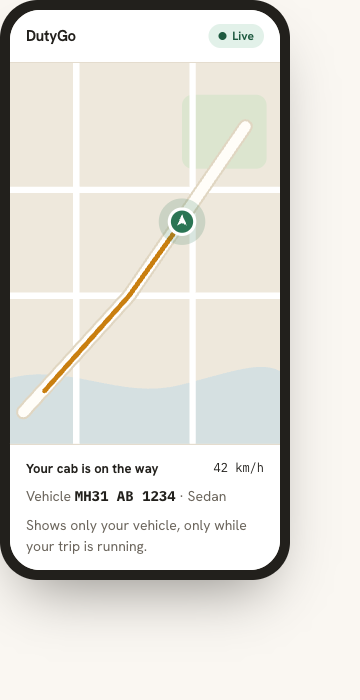
Share a secure link so a guest can follow their own cab, only while the trip is running.
Signed duty slips
The guest's digital signature is captured on the duty slip.
Invoices and reports
Follow invoices and download reports as PDF or CSV for reconciliation.
Separate company data
Data is organised per organisation, so clients stay separated.
How a company books with its vendors
Company admin books
Adds the booking from the corporate admin login.
Assigns to a vendor
The right vendor receives the duty.
Vendor allocates
A vehicle and driver are assigned and can be tracked.
Company follows
Bookings, vehicles and invoices are visible in one place.
Corporate car booking system for companies and their vendors.
Each company gets its own corporate admin login. This corporate cab booking software lets the admin add bookings directly, assign them to vendors and follow every booking, vehicle and invoice.
- The corporate admin adds corporate cab booking requests from their own end, with no need to call or email the operator.
- The company assigns the booking to its vendors, so the right vendor receives the duty and allocates a vehicle and driver.
- Company staff see only their own company's data.
- Corporate cab booking management stays in one place: bookings, vehicles, invoices and reports.
Employee transportation management: employee and guest cab duties.
For corporate travel desks, employee transportation often means booked cab duties for staff and guests: airport transfers, client visits and outstation trips. DutyGo covers these as employee transportation management software for booked duties.
- Live tracking, guest-verified trips, duty slips and reports support corporate travel management and reconciliation.
- Vendors serve the duties, and the company follows them from its own login.
- DutyGo does not plan shift rosters or fixed commute routes for employees.
Corporate cab booking across cities and customers
Clients who book for themselves use a customer self-service cab booking portal. Operators serving companies can read cab vendor management software.
Guides: corporate cab management in India, corporate cab booking management in Pune, corporate cab management in Hyderabad, corporate cab booking software in Nagpur and employee transportation software in Ahmedabad.
How does a company book cabs through its vendors?
Can one company see another company's data?
Can corporate guests track their cab?
Is DutyGo an employee shift-roster tool?
Find what you need.
Ready to simplify your duty operations?
See DutyGo in action with a free walkthrough tailored to your fleet.