

Outstation Cab Management Software for Day-KM Duties
Run outstation duties without paper trip sheets. DutyGo handles Day-KM (Outstation) bookings, vehicle and driver allocation, kilometre checks, toll and parking bills, live tracking and the final invoice.
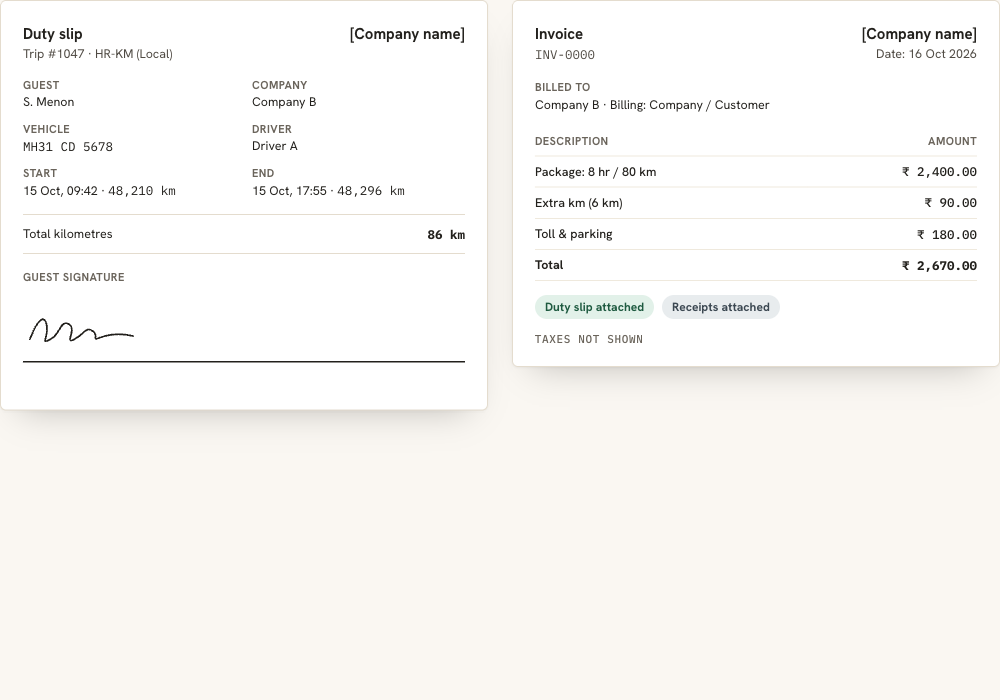
Outstation trips are won or lost on the paperwork.
Long runs mean kilometres, tolls, parking and a guest who is far from your office. DutyGo captures these at the source, so the invoice reflects what actually happened. As outstation cab software it covers the whole duty, from quote to invoice.
- Choose Day-KM (Outstation) as the duty type when you create the booking.
- Set duty pricing by city, vehicle group and package, with hours and kilometres included.
- Drivers record start and end kilometres, and the end reading must be higher than the start reading.
- Drivers add toll, parking and other bills with the amount and a photo of each bill.
Local and monthly duties use the same flow. See cab duty management software for HR-KM, Long Duration and Flat Rate.
What DutyGo handles on an outstation duty.
Day-KM pricing and packages
Define duty pricing by city, vehicle group and package so quotations stay consistent.
Vehicle and driver allocation
Pick an available vehicle and a driver for the dates, and change either later if plans shift.
Driver updates and expenses
Start and end the trip from a phone link, verified by the guest signature or OTP.
Live tracking and guest link
GPS-enabled vehicles appear on a live map, and guests follow only their own vehicle while the trip runs.
Duty slip and invoice
Generate the PDF duty slip and invoice from the completed trip, with supporting bills attached.
Reports
Download reports by date range as PDF or CSV for accounts and client billing.
An outstation duty, step by step
Book
Create the booking with the Day-KM (Outstation) duty type, guest and schedule.
Allocate
Assign the vehicle and driver and notify them by SMS or email.
Run the trip
The driver starts and ends the trip, adds bills and verifies with the guest.
Bill
Create the duty slip and invoice from the completed trip.
Outstation duties by region
Outstation work looks different in every region. DutyGo has guides for Maharashtra, the Mumbai–Pune Expressway in Pune, the Mumbai–Nashik–Shirdi route in Nashik and long runs from Nagpur.
The whole trip lifecycle is described in the taxi trip management platform overview, and cab vendor management software covers the case where a vendor delivers the duty.
Which duty type covers outstation trips?
How are toll and parking recorded on outstation trips?
Can the guest track an outstation trip?
Does DutyGo support GST e-invoicing?
Find what you need.
Ready to simplify your duty operations?
See DutyGo in action with a free walkthrough tailored to your fleet.